2023年9月28日木曜日

20230929 観測と観察の 正面 視線距離


blender python 


トーラスを作る

半径1 薄い青

マイナー半径 0.05

RGBA 4値で 色を付ける


import bpy


# トーラスを作成

bpy.ops.mesh.primitive_torus_add(

    align='WORLD',

    location=(0, 0, 0),    # トーラスの中心の座標

    rotation=(0, 0, 0),    # トーラスの回転

    major_radius=2,        # 半径

    minor_radius=0.03      # マイナー半径

)


# トーラスの名前を設定

torus_object = bpy.context.active_object

torus_object.name = "Torus_radius=2"  # 名前を設定


# トーラスのマテリアルを作成

material = bpy.data.materials.new(name="Radius2Material")

material.use_nodes = False  # ノードを使用しない


# 色を指定(RGBA) - もう少し濃い水色

material.diffuse_color = (0.2, 0.4, 1, 1)


# トーラスにマテリアルを割り当て

torus_object.data.materials.append(material)


import bpy

import math


# 半径

radius = 2


# 正六角形の頂点座標を計算

vertices = []

for i in range(6):

    angle = i * math.pi / 3  # 60度ごとに頂点を配置

    x = radius * math.cos(angle)

    y = radius * math.sin(angle)

    z = 0

    vertices.append((x, y, z))


# 新しいメッシュを作成

mesh = bpy.data.meshes.new(name="正六角形_r=2_mesh")

obj = bpy.data.objects.new("正六角形_r=2", mesh)


# メッシュデータに頂点座標を設定

mesh.from_pydata(vertices, [], [(0, 1, 2, 3, 4, 5)])


# シーンに追加

scene = bpy.context.scene

scene.collection.objects.link(obj)


# オブジェクトをアクティブに設定

bpy.context.view_layer.objects.active = obj

obj.select_set(True)


# マテリアルを作成

material = bpy.data.materials.new(name="水色Material")

material.use_nodes = False

material.diffuse_color = (0.5, 0.8, 1.0, 1.0)  # RGBA


# オブジェクトにマテリアルを割り当て

obj.data.materials.append(material)


2023年8月28日月曜日

20230828 光時計 追加 minus側


#  コレクションを作る 重複の場合 作らない


import bpy


# List of collection names

collection_names = [ 

"光時計 +y",

 "光時計 -y",

"abcdefg",

"abcdefg",

"abcdefg",

"abcdefg"


]


# Function to create a new collection if it doesn't exist

def create_collection_if_not_exists(name):

    if name not in bpy.data.collections:

        collection = bpy.data.collections.new(name)

        bpy.context.scene.collection.children.link(collection)


# Create collections

for name in collection_names:

    create_collection_if_not_exists(name)


2023年8月26日土曜日

20230827 カメラ動かし練習

20230827 カメラ動かし練習


blender python 


カメラを作る


curve で 円を作る 半径3

カメラを object contraint で

curve円周上を動かす アニメ


位置 000に track to する

カメラ位置を follow path で 円周にする


基本系 配布 001 単位円 torus と xyz軸 円柱

https://drive.google.com/file/d/1adh0pC0n5MUfaPnsQcab8CnTvHu_JqLg/view?usp=drive_link


基本系 配布 002 単位2長さ balls

https://drive.google.com/file/d/1vyg5oFWmw_TK8nwp5TmVSfLH94I6rTaY/view?usp=drive_link


基本系 配布 003 単位2長さ balls 光時計セット 

https://drive.google.com/file/d/1u2Rn_nVBcewe39Vokua9C5n25cdivyyL/view?usp=drive_link


blender 基本系 配布 カタログ 2023 - zionad_mainのブログ https://mokuji000zionad.hatenablog.com/entry/2023/07/31/095208 


2023年8月21日月曜日

20230821f 円柱連続


import bpy


def create_cylinder_and_rotate(location, index):

    bpy.ops.mesh.primitive_cylinder_add(radius=0.03, depth=1, location=location)

    cylinder = bpy.context.active_object

    cylinder.name = f"円柱xy t={index:.1f}  ({location[0]:.1f},0,{location[2]:.1f}) to ({location[0]:.1f},1,{location[2]:.1f})"

    cylinder.rotation_euler.x = 1.5708  # 90度をラジアンで表現


# 繰り返し処理で円柱を作成

x_value = 0.1

for z in range(-9, 0):

    create_cylinder_and_rotate((x_value, 0.5, z * 0.1), z * 0.1)

    x_value += 0.1


20230821e コレクションを作る


#  コレクションを作る 重複の場合 作らない


import bpy


# List of collection names

collection_names = [ 

"21_ r=1",

"21_ r=2",

"均等 Torus",

"線分線路 rail",

"rail t=-2",

"rail t=-1",

"rail t=0",

"途中 制作途中",

"円錐"


]


# Function to create a new collection if it doesn't exist

def create_collection_if_not_exists(name):

    if name not in bpy.data.collections:

        collection = bpy.data.collections.new(name)

        bpy.context.scene.collection.children.link(collection)


# Create collections

for name in collection_names:

    create_collection_if_not_exists(name)


基本系 配布 001 単位円 torus と xyz軸 円柱

https://drive.google.com/file/d/1adh0pC0n5MUfaPnsQcab8CnTvHu_JqLg/view?usp=drive_link


基本系 配布 002 単位2長さ balls

https://drive.google.com/file/d/1vyg5oFWmw_TK8nwp5TmVSfLH94I6rTaY/view?usp=drive_link


基本系 配布 003 単位2長さ balls 光時計セット 

https://drive.google.com/file/d/1u2Rn_nVBcewe39Vokua9C5n25cdivyyL/view?usp=drive_link


blender 基本系 配布 カタログ 2023 - zionad_mainのブログ https://mokuji000zionad.hatenablog.com/entry/2023/07/31/095208 


20230821d xy円周√2


トーラスを作る

中心000

メジャー半径 √2

半径の小数2桁の名前にする 

マイナー半径 0.01

xy平面に作る


import bpy

import math


# トーラスを作成(xy平面上)

bpy.ops.mesh.primitive_torus_add(align='WORLD', location=(0, 0, 0), rotation=(0, 0, 0), major_radius=math.sqrt(2), minor_radius=0.01)


# 作成したオブジェクトを取得

torus = bpy.context.active_object


# メジャー半径を小数第2位までに丸める

major_radius_rounded = round(math.sqrt(2), 2)


# 名前を設定

torus.name = f"トーラス xy平面 r={major_radius_rounded} ma=√2 mi=0.01"


基本系 配布 001 単位円 torus と xyz軸 円柱

https://drive.google.com/file/d/1adh0pC0n5MUfaPnsQcab8CnTvHu_JqLg/view?usp=drive_link


基本系 配布 002 単位2長さ balls

https://drive.google.com/file/d/1vyg5oFWmw_TK8nwp5TmVSfLH94I6rTaY/view?usp=drive_link


基本系 配布 003 単位2長さ balls 光時計セット 

https://drive.google.com/file/d/1u2Rn_nVBcewe39Vokua9C5n25cdivyyL/view?usp=drive_link


blender 基本系 配布 カタログ 2023 - zionad_mainのブログ https://mokuji000zionad.hatenablog.com/entry/2023/07/31/095208 


2023年8月20日日曜日

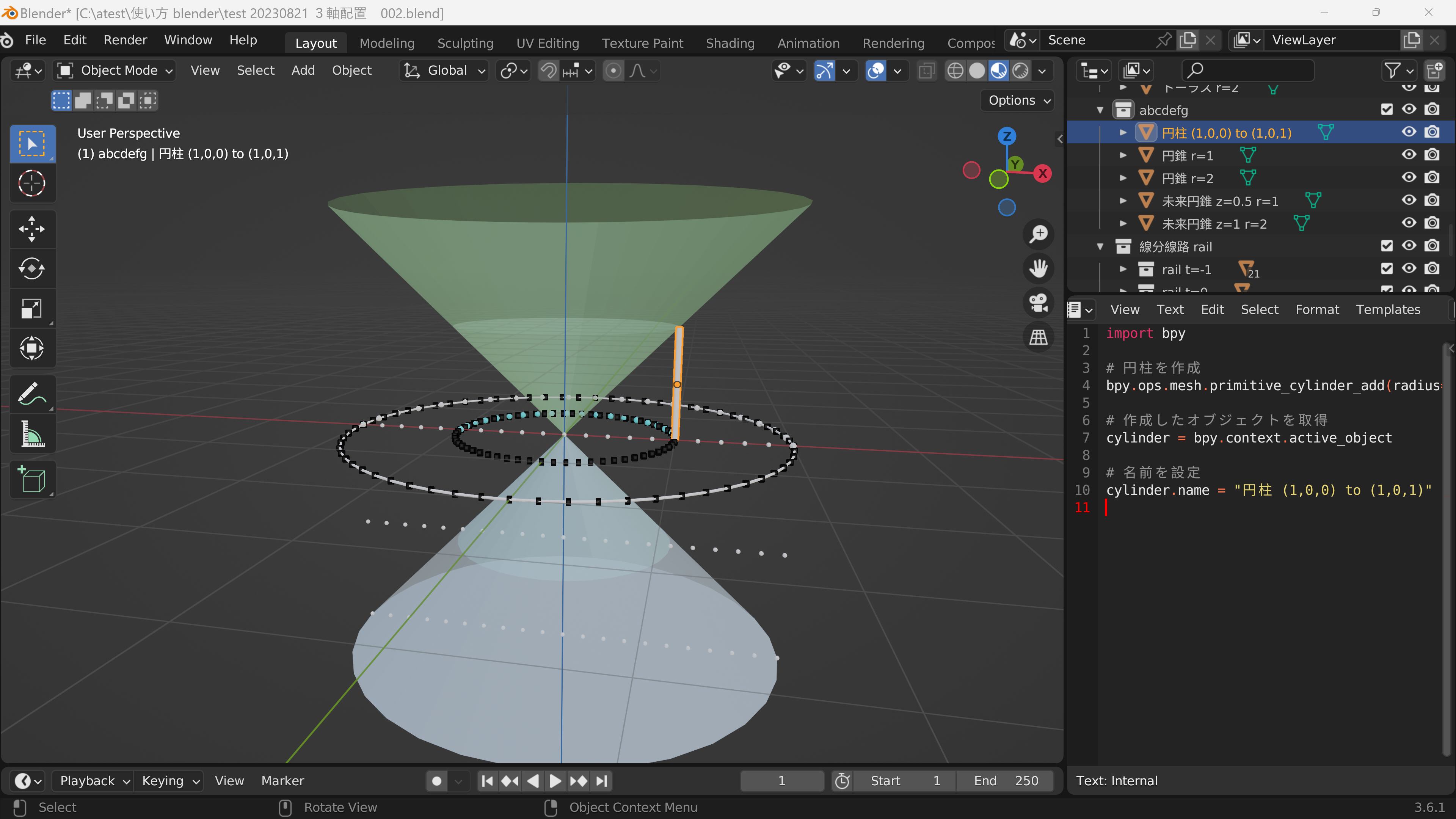
20230821c 円柱


円柱を作る

(1,0,0)から

(1,0,1)

マイナー半径 0.03


import bpy


# 円柱を作成

bpy.ops.mesh.primitive_cylinder_add(radius=0.03, depth=1, location=(1, 0, 0.5))


# 作成したオブジェクトを取得

cylinder = bpy.context.active_object


# 名前を設定

cylinder.name = "円柱 (1,0,0) to (1,0,1)"


円柱を作る

(1,0,0)から

(1,1,0)

マイナー半径 0.03

いまのを x軸で90度回転させる


import bpy


# 円柱を作成

bpy.ops.mesh.primitive_cylinder_add(radius=0.03, depth=1, location=(1, 0.5, 0))


# 作成したオブジェクトを取得

cylinder = bpy.context.active_object


# 名前を設定

cylinder.name = "円柱xy t=0  (1,0,0) to (1,1,0)"


# x軸で90度回転

cylinder.rotation_euler.x = 1.5708  # 90度をラジアンで表現


import bpy


# 円柱を作成

bpy.ops.mesh.primitive_cylinder_add(radius=0.03, depth=1, location=(0, 0.5, -1))


# 作成したオブジェクトを取得

cylinder = bpy.context.active_object


# 名前を設定

cylinder.name = "円柱xy t=-1  (0,0,-1) to (0,1,-1)"


# x軸で90度回転

cylinder.rotation_euler.x = 1.5708  # 90度をラジアンで表現


基本系 配布 001 単位円 torus と xyz軸 円柱

https://drive.google.com/file/d/1adh0pC0n5MUfaPnsQcab8CnTvHu_JqLg/view?usp=drive_link


基本系 配布 002 単位2長さ balls

https://drive.google.com/file/d/1vyg5oFWmw_TK8nwp5TmVSfLH94I6rTaY/view?usp=drive_link


基本系 配布 003 単位2長さ balls 光時計セット 

https://drive.google.com/file/d/1u2Rn_nVBcewe39Vokua9C5n25cdivyyL/view?usp=drive_link


blender 基本系 配布 カタログ 2023 - zionad_mainのブログ https://mokuji000zionad.hatenablog.com/entry/2023/07/31/095208